WP Quick Tools · WordPress PluginThe tools you need.
When you need them.
WP QUICK TOOLS
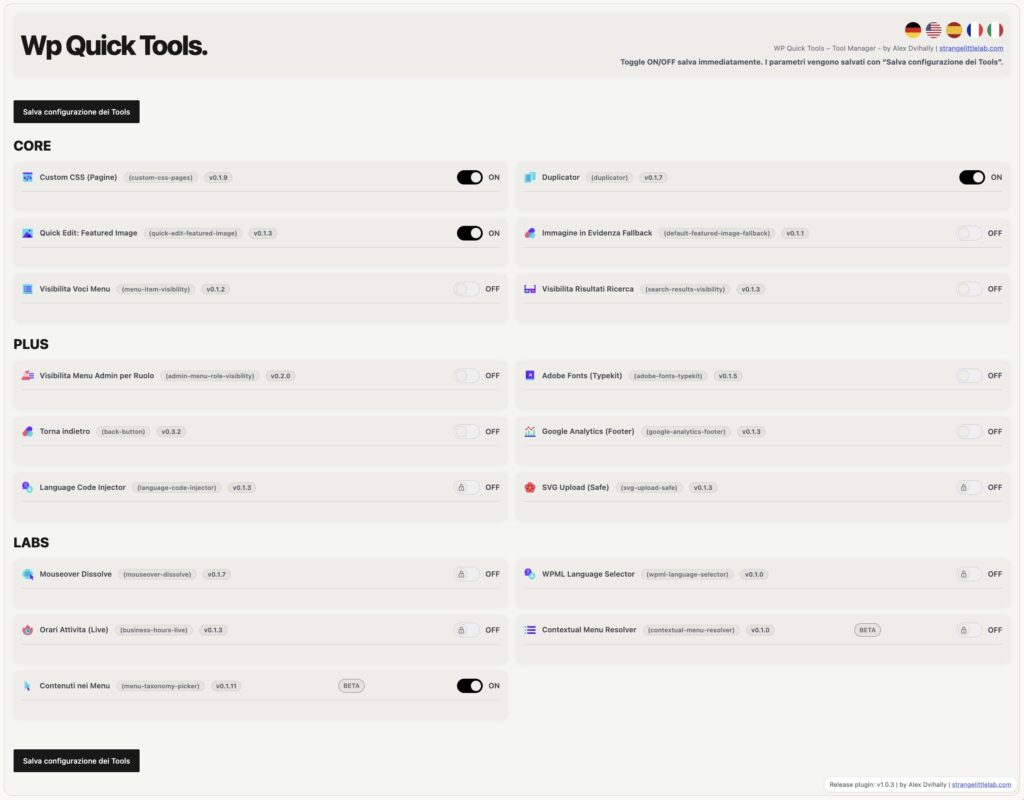
WP Quick Tools is the WordPress plugin designed for anyone who wants to manage their site’s everyday tasks more easily, without installing a separate plugin for every small need. It brings together a collection of practical tools in one panel: you can enable only the ones you need and configure each feature to suit your requirements.
The tools are based on the hands-on experience of Alexandre Dvihally, who has been developing business, museum and experimental WordPress websites since 2006. Each tool addresses specific needs encountered in day-to-day work that often have no straightforward solution in other plugins.
Activate thoughtfully.
Each module handles a specific task. Enable the features you need without activating the whole collection.
Stay in control.
Centralized settings and configuration export and restore tools help you prepare and review changes. They do not replace a site backup.
Integrate, then test.
WQT uses WordPress APIs and offers optional integrations. Before using WP Quick Tools on your site, create a backup and check that the modules work with your theme and page builder, preferably in a test environment.
One collection. Seventeen possibilities.
The full package includes 17 modules, including 5 experimental LABS modules. Choose which ones to enable based on your site’s needs.
Apply custom CSS to a page or your entire WordPress site
Custom CSS is one of the modules included in WP Quick Tools. Customize your site’s appearance with CSS rules applied across WordPress or only to selected pages. Each group of rules can have a title and can be enabled or disabled separately.
For example, adjust the spacing on a promotional page without changing other pages, or define a shared style for the entire site. Import and export features help preserve your configurations. You need to understand CSS selectors and check the result with your chosen theme and builder.
Duplicate content and menus without starting from scratch
Duplicator is the WP Quick Tools module for copying existing content and configured menus. It reuses content and metadata so you can start from an existing structure when preparing a new page or a navigation variation.
With WPML, the copy stays in the same language and is not automatically linked as a translation. Treat it as a starting point to review: check links, metadata and builder-specific settings before publishing. The module also reports any partial errors during copying.
Change the featured image through Quick Edit
Quick Edit: Featured Image is the WP Quick Tools module that lets you change the featured image through WordPress Quick Edit, with a preview of the selected image.
When working through a list of posts, you can update the associated photo without opening the full content editor each time. It is a shortcut for a common editorial task. It affects the featured image, not images in the page body or gallery settings.
Show a fallback image on posts that have none
Featured Image Fallback is the WP Quick Tools module that displays a backup image when a post has no featured image of its own. The image is used as a display fallback rather than actually being assigned to each individual post.
It can make content lists more consistent when some cards have no photo. Existing featured images remain separate from the fallback. Check the result in your theme or builder, since the way images are requested and displayed can vary.
Show different menu items to users and visitors
Menu Item Visibility is the WP Quick Tools module that determines whether individual menu items are displayed according to login status. It lets you offer different navigation to visitors and signed-in users.
For example, provide one entry for signing in and another for the user area. This controls whether a link appears in the menu: it does not replace protection of the linked page. Restricted content still needs appropriate access permissions.
Choose which content appears in WordPress search
Search Results Visibility is the WP Quick Tools module that controls which content can appear in WordPress search. Settings cover content types, categories and taxonomies, as well as pages to exclude.
It is useful when your site contains material you do not want to show in internal search, such as technical pages or sections unrelated to normal browsing. Excluding content from search does not make it private or prevent access through its URL. External search engines and custom search systems require separate checks.
Simplify the administration menu for each role
Admin Menu Visibility by Role is the WP Quick Tools module that hides selected administration sidebar entries according to the user’s role. Per-role controls let you reduce the options shown to people carrying out specific tasks.
For example, simplify navigation for people who mainly manage content. This is an interface choice: hiding an entry does not revoke permissions or by itself protect direct access to a screen. Actual authorization remains governed by WordPress capabilities.
Use Adobe Fonts across your site or on selected pages
Adobe Fonts (Typekit) is the WP Quick Tools module that connects fonts from your Adobe project to your WordPress site. Enter a Project ID or a custom snippet, then choose whether to apply it sitewide or only to selected pages.
Use it to maintain your brand typography or apply a dedicated kit to a landing page. Duplicate-prevention options help avoid repeated loading. The kit and its usage rights remain managed through Adobe Fonts.
Return to the previous page and retain your position
Go Back is the WP Quick Tools module that adds a button or link to return to the previous internal page and restore the scroll position. Insert it using a shortcode and customize its label and appearance.
It is handy when moving from a list to a detail page. If a visitor arrives from an external source, choose a fallback: the homepage, a custom URL, a hidden button or a disabled button. This explicitly defines what happens when there is no usable previous internal page.
Add Google Analytics to the footer while avoiding duplicates
Google Analytics (Footer) is the WP Quick Tools module that inserts your configured tracking code in the footer. Duplicate detection helps prevent the same tracking code from being added more than once.
Use it to centralize this code instead of scattering it across theme files and page content. Before enabling it, check whether your theme or another plugin already loads Analytics. Adding the code does not replace consent configuration or checking the service settings.
Load different code for each site language
Language Code Injector is the WP Quick Tools module that inserts HTML or JavaScript snippets before the closing body tag according to the language. Automatic detection supports WPML, Polylang, TranslatePress and Weglot, falling back to the WordPress locale.
Use it when an integration requires different code for each language version of your site. It does not translate content: it chooses which snippet to load. This tool is intended for administrators who understand the code they insert; every snippet must also be checked for requests to external services.
Upload sanitized static SVG images
SVG Upload (Safe) is the WP Quick Tools module for controlled uploading of static SVG images by authorized users. Sanitization is mandatory and excludes scripts and external resources.
It is useful for vector logos and icons that need to stay sharp at different sizes. Not every SVG is a simple image: files containing active content or unsupported structures may be rejected or modified by validation. The module name is not an absolute security guarantee; always use files from trusted sources.
Connect elements with hover effects — experimental
Mouseover Dissolve is the WP Quick Tools module for connecting an element that receives a mouse hover to a target element. Interactions can combine fading and movement.
For example, hovering over a list item can trigger a visual change in a nearby area. Configuration depends on the elements actually present on the page. Hover effects enhance the interface: essential content must remain understandable and usable on touch devices and without a mouse.
Add a compact WPML language selector — experimental
WPML Language Selector is the WP Quick Tools module that displays a compact selector for languages managed by WPML. It excludes the current language and languages for which the content has no translation.
Use it to offer only language alternatives relevant to the current page, with simple navigation. It requires WPML and available translated content: the module does not create translations or replace their management. Check the integration wherever you insert the selector in your theme or builder.
Show whether a business is open right now — experimental
Business Hours (Live) is the WP Quick Tools module that shows whether a business is currently open. Settings include weekly opening hours, closures and special days, allowing the message to account for exceptions to the regular schedule.
It is useful for shops, offices and services with public opening hours. Messages can show the current status and information about the next opening or closing time. Keep the schedule up to date: the module displays your configured calendar and does not automatically detect whether staff are actually present.
Choose a menu based on the page — experimental
Contextual Menu Resolver is an experimental WP Quick Tools module that dynamically selects the frontend menu based on the page context. Configuration uses rules, weights and a fallback menu.
Use it when different site sections need different navigation paths. Rule priorities help resolve cases where several conditions match; the fallback defines the alternative choice. Check the affected pages and theme menu locations before use. It is included in the beta package and is not presented as a feature already certified for every builder.
Add content and taxonomies to menus — experimental
Content in Menus is an experimental WP Quick Tools module. It makes selected public content types and taxonomies available under Appearance → Menus so you can add individual content items and terms to your navigation.
It is useful for sites that use other public content types alongside posts and pages. The module makes items easier to select: it does not create new content types or automatically assign a menu to the theme. It belongs to the package with beta modules and needs testing in your own project.